

Smart links
A Smart Link is a single URL that routes incoming traffic to one of several offers based on a strategy you define. Instead of giving publishers a separate link per offer, you give them one Smart Link that handles routing automatically and respects every offer’s caps, targeting, and fraud rules.
Before you begin
Section titled “Before you begin”- Create at least two offers you want to route traffic between.
- Decide whether you want weight-based testing or priority-based fallback routing.
When to use a Smart Link
Section titled “When to use a Smart Link”- Routing across multiple offers with weight-based A/B distribution.
- Prioritizing a high-performing offer while keeping fallbacks ready.
- Sending broad publisher traffic to the best available offer given targeting, caps, and fraud rules.
Create a Smart Link
Section titled “Create a Smart Link”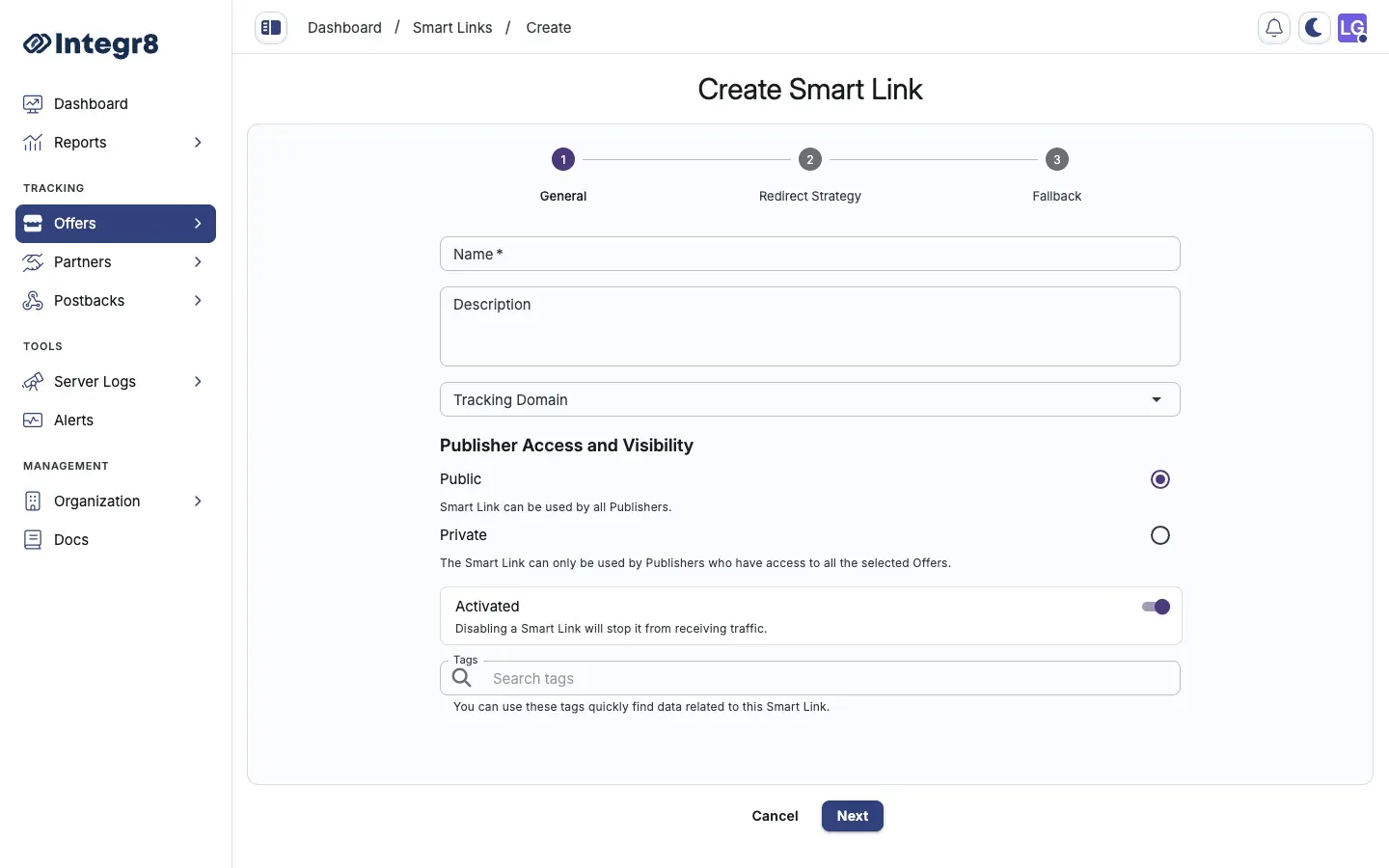
- Go to Offers > Smart Links and click Create.
- General Settings:
- Enter a Name and optional Description.
- Select the Tracking Domain.
- Set Publisher Access:
Public(all publishers) orPrivate(only publishers with access to the assigned offers). - Toggle to activate or deactivate the link.
- Click Next.
- Redirect Strategy:
- Weight: distribute traffic by percentage across offers. Use for testing.
- Priority: attempt offers in order; if the top offer blocks the click (cap, targeting, fraud), try the next.
- Click Select Offers to add offers to the Smart Link.
- Click Next.
- Fallback Offer (recommended): select an offer with no targeting restrictions, no caps, and no fraud filters as a guaranteed fallback.
- Click Save.
Redirect strategy comparison
Section titled “Redirect strategy comparison”| Strategy | Best for |
|---|---|
| Weight | Testing multiple offers, balanced traffic distribution |
| Priority | Clear winner offer with backup options |
Common pitfalls
Section titled “Common pitfalls”| Issue | Fix |
|---|---|
| No fallback set | Always assign a fallback offer with no restrictions. |
| Wrong strategy for use case | Use Weight for testing, Priority when you have a winner. |
| Private link with mismatched permissions | Verify every offer in the link is accessible to your publishers. |
If no offer in the Smart Link accepts a click and no fallback is set, the click is lost: no redirect and no logging. Always set a fallback.
Next steps
Section titled “Next steps”- Set offer caps so the Smart Link can detect a capped offer and fall through.
- Apply targeting rules on the offers in the link to control which clicks each one accepts.