

Tracking links
A tracking link is the URL you give to publishers. Every click on that URL is logged in Integr8 with a unique transaction_id that is later matched to a conversion. This guide walks you through generating one and explains the parameters you can pass.
Before you begin
Section titled “Before you begin”- Create an offer with a redirect URL that includes the
{transaction_id}macro. - Add at least one publisher in Publishers > Publishers Management.
Generate a tracking link
Section titled “Generate a tracking link”The simplest place to build a link is the Global Tracking page, which has a generator that works for any offer.
- Go to Offers > Global Tracking.
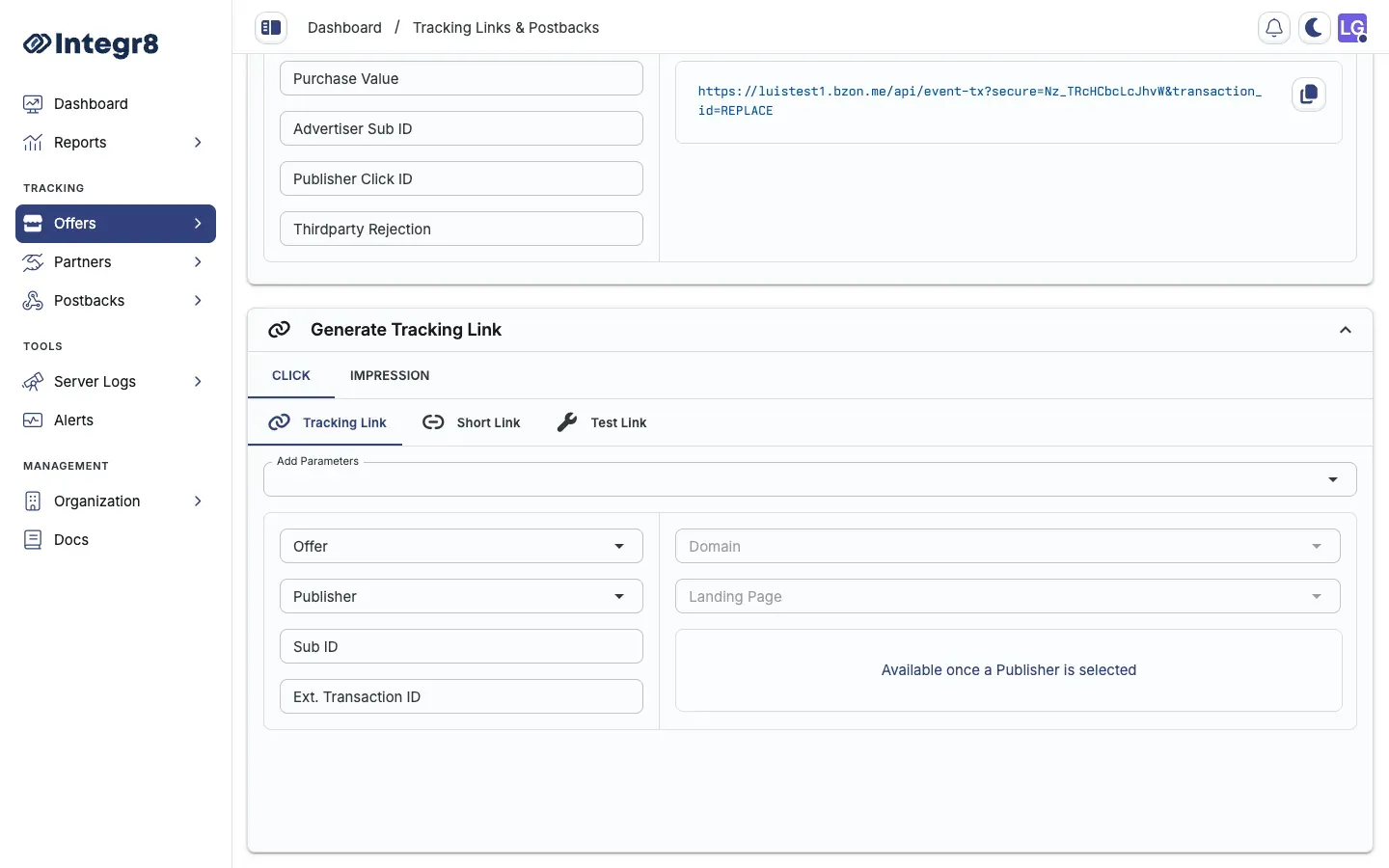
- In the Generate Tracking Link card, select the Offer and the Publisher.
- Optionally set a Sub ID (recommended for source tracking), a Landing Page, and a Domain.
- Copy the generated link and share it with the publisher.
Shortcut: From Offers > Offers Management, click the link icon on an offer’s row to open the generator for that offer directly.
To pass the publisher’s own click ID back on the conversion, add &external_transaction_id=PUBLISHER_CLICK_ID to the link.
Link types
Section titled “Link types”The click generator uses tabs for different link formats:
| Tab | Use case |
|---|---|
| Tracking Link | Default for most integrations |
| Short Link | Compressed tracking URL |
| Test Link | Ignores caps and targeting. Use to verify setup before going live |
JavaScript / fingerprinting links
Section titled “JavaScript / fingerprinting links”Use JavaScript/fingerprinting links when fraud detection rules depend on browser signals: duplicate-click detection, bot scoring, and device anomaly checks.
Enable fingerprinting on an offer
Section titled “Enable fingerprinting on an offer”During create: In the Create Offer form, open the Tracking Link section and turn on Enable JavaScript/Fingerprinting Tracking.
On an existing offer: Open the offer, go to Settings, and enable the same option under tracking settings.
How it works
Section titled “How it works”When fingerprinting is enabled, generated links use the /jsp path instead of the root path:
- A small script runs in the browser.
- The script collects environment signals: user agent, screen resolution, timezone, installed fonts, canvas hash, and WebGL data.
- The fingerprint is hashed and attached to the click record.
- The visitor is redirected to the offer landing page as normal.
Example:
https://track.yourdomain.com/jsp?offer=42&publisher=7&sub_id=newsletter&external_transaction_id=CLICK_ID_HEREStandard links without /jsp do not collect fingerprints. Fingerprint-based fraud rules only apply to clicks that arrive through this link type. See Fraud detection.
Requirements and limitations
Section titled “Requirements and limitations”- JavaScript must be enabled in the visitor’s browser.
- Adds a small delay (typically under 50 ms) before redirect.
- No changes needed on the advertiser or publisher side. The script runs on the redirect.
Tracking link parameters
Section titled “Tracking link parameters”| Parameter | Description |
|---|---|
offer |
Offer ID |
publisher |
Publisher ID |
sub_id |
Sub-publisher identifier for source attribution |
external_transaction_id |
Publisher’s own click ID, returned in the conversion postback |
lp |
Landing page ID. Optional. Uses the offer default if omitted. |
Example
Section titled “Example”https://track.yourdomain.com/?offer=42&publisher=7&sub_id=newsletter&external_transaction_id=CLICK_ID_HERENext steps
Section titled “Next steps”- Configure conversion tracking so postbacks match clicks to conversions.
- Use a custom tracking domain instead of the default Integr8 domain.